486 Gentoo (in 2023/24 and in 86Box)
If you try to boot a Gentoo install CD in 86Box (or a real 486, lucky you!), as of this writing, it won’t get past GRUB.
GRUB’s easy to get around, you just use the syslinux family of bootloaders instead, specifically isolinux.
That being said… something has changed since the last time someone did this in 2018.
isolinux won’t save you
Unpack a Gentoo x86 minimal install ISO into a directory (I use bsdtar), cd
into the directory, fetch a copy of
isolinux.bin and
ldlinux.c32,
save this file as isolinux.cfg:
DEFAULT gentoo
LABEL gentoo
	KERNEL /boot/gentoo
	INITRD /boot/gentoo.igz
	APPEND cdroot nomodeset console=tty1
run this command:
$ mkisofs -o gentoo-i486-syslinux-only.iso -b isolinux.bin -c boot.catalog -no-emul-boot -boot-load-size 4 -boot-info-table -J -R .
Load that ISO into 86Box, though there’s a slight hitch here. 486 motherboards made when the 486 was new1 predate El Torito, so they won’t boot off CD. I suggest using a SCSI card and enabling its BIOS to get around that. Once that’s done, you’ll be greeted with failure:
ISOLINUX 6.04  ETCD Copyright (c) 1994-2015 H. Peter Anvin et al
Loading /boot/gentoo... ok
Loading /boot/gentoo.igz... ok
No EFI environment detected.
early console in extract_kernel
input_data: 0x01886094
input_len: 0x003d842c
output: 0x01000000
output_len: 0x00b80394
kernel_total_size: 0x00c76000
needed_size: 0x00c76000

Decompressing Linux... Parsing ELF... No relocation needed... done.
Booting the kernel.
[blinking cursor]
and as you wait for a kernel that never boots, you’ll come
to the realization that you’ve entered endbr32 hell.
Prior Art
Before I get too ahead of myself, I’m going to say right now that I’m standing on someone else’s shoulders. Wait, no, that’s not what I –
I’m not the first person to do this. I linked it earlier, but I should give proper credit; Yeo Kheng Meng in his article A Science Project: “Make the 486 Great Again!” - Modern Linux in an ancient PC did the same thing back in 2018. And that was on real hardware! I’m limited to an emulator that I’m assuming is accurate enough for my purposes.
endbr32, and why I hate it
endbr32 comes from Intel’s (brace yourself)
“Control-flow Enforcement Technology”. I’m sure Intel CET does very important things,
but for the purposes of this cursed adventure, it’s i486 Enemy #1.
endbr32 decodes to a hinting NOP on Pentium Pros and later (give or take),
but is an illegal instruction on 486s and Pentiums (“586”, as some might call them).
This causes significant problems for a 486 running binaries “polluted” with
CET instructions. The rot goes further! If GCC itself wasn’t built with
--disable-cet, it’ll end up into GCC’s builtins, which propagates further
into the libc, which propagates into the userland, which causes 486s to “die in pain”.2
For that reason, I’m gonna be using a patch
that lets 486s “jump over” endbr32. I’ve modified the paths in my copy to make it work
as a -p1 patch, but it’s otherwise unmodified from the one in the gray486linux repo.
The patch isn’t joking, by the way. The table goes something like this:
--disable-cet/patched |
Yes | No |
|---|---|---|
| Yes | Works! | Works! |
| No | Works! | Dies in pain. |
I don’t quite get it, but the patch magically fixes kernels built with CET-enabled compilers. Plus, it grants your machine a ‘get out of crash free’ card; even if the kernel is CET-free and the userland is CET-free, the things you’re compiling are likely going to try checking for CET support. I haven’t checked if it does crash a 486, but I wouldn’t risk crashing the system while configuring binutils.
It’s Gentooin’ Time
So! Let’s go and patch the kernel, specifically 6.6.19 LTS.
$ curl -O https://cdn.kernel.org/pub/linux/kernel/v6.x/linux-6.6.19.tar.xz
$ tar xf linux-6.6.19.tar.xz
$ cd linux-6.6.19
$ patch -p1 < 0001-WIP-patch-kernel-to-skip-endbr32-instruction-on-real.patch
I had to make tinyconfig and start configuring from there, but you get to use the config I wrote.
For whatever reason, it seems like enabling some things crashes the machine regardless of CETitude.
I didn’t feel like tracking it down, and it’s probably best to start with a bare-minimum kernel
that just barely boots my specific 86Box config3
Oh, make sure to move my .config into place.
$ cp ../486-kconfig .config
As usual, make -j$(nproc) (or however many cores you have if you don’t have nproc).
Download the latest x86 Gentoo minimal install ISO.
We’re gonna need to unpack the Gentoo ISO and transplant syslinux and our kernel.
$ mkdir unpack && cd unpack
$ bsdtar xf install-x86-minimal-*.iso # or however you extract ISOs

## Bit weird to link to Rocky Linux, but this seems to be the
## only reliable place to find isolinux.bin and ldlinux.c32 as loose files
$ curl --remote-name-all https://download.rockylinux.org/pub/rocky/9/BaseOS/x86_64/os/isolinux/isolinux.bin https://download.rockylinux.org/pub/rocky/9/BaseOS/x86_64/os/isolinux/ldlinux.c32
I should note that the ISO has Rock Ridge extensions for no apparant reason4, and every file in here has mode 0444. It’s sloppy to be root more than necessary, so I’m going to explicitly fiddle with the permissions.
$ chmod +w boot/gentoo
$ cp ../linux-6.6.19/arch/x86/boot/bzImage boot/gentoo
$ chmod 0444 boot/gentoo
Splat in an isolinux.cfg…
cat > isolinux.cfg << \EOF
DEFAULT gentoo
LABEL gentoo
    KERNEL /boot/gentoo
    INITRD /boot/gentoo.igz
    APPEND cdroot nomodeset
EOF
…and make the ISO.
$ mkisofs -o gentoo-i486.iso -b isolinux.bin -c boot.catalog -no-emul-boot -boot-load-size 4 -boot-info-table -J -R .
Load that sucker into 86Box and watch it go! Very slowly. Excruciatingly slowly. 25 megahertz isn’t very fast, after all. I suggest switching to a faster 486-class chip; the Intel iDX4 at 100 MHz is your best bet5. You might need to wait hours (3 hours on the 486DX/25) to see it boot, but it’ll work. “Pics or it didn’t happen”, so here’s it downloading binutils:
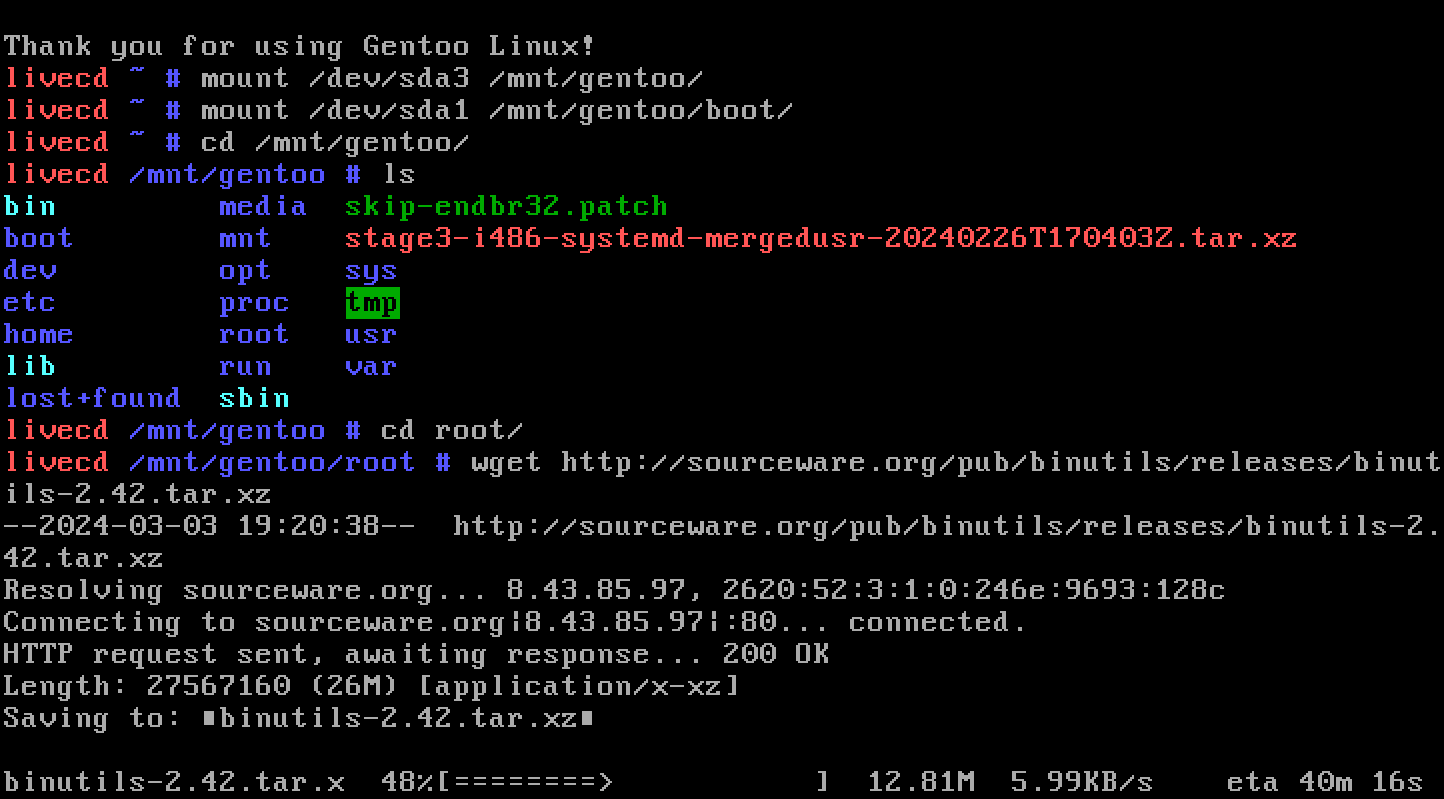
Isn’t it great? Taste that 5 kilobyte-a-second download speed! There’s plenty of candidates for “slowest machine to run Linux”, but I’m reasonably sure this counts as the slowest machine to run a Linux distro with minor modifications to the install media. Not just a kernel, not a kernel and a static BusyBox glued to the end, a general-purpose Linux distribution.
Making it boot faster
Okay, it works. But it takes forever to boot – 3 hours is excruciating, and I’d posit you’d like that not to be the case. The xz compression used in the initramfs and squashfs is really dragging down (up?) boot time here. We can instead recompress these files into lz4. lz4 has a pretty poor compression ratio, but it decompresses fast6. It’s fast enough that it tends to do as well as, or better than, a straight RAM-to-RAM copy on modern machines.
Alright, let’s get down to business.
Unpack, then transplant syslinux and the kernel…
$ mkdir unpack-lz4 && cd unpack-lz4
$ bsdtar xf install-x86-minimal-*.iso
$ curl --remote-name-all https://download.rockylinux.org/pub/rocky/9/BaseOS/x86_64/os/isolinux/isolinux.bin https://download.rockylinux.org/pub/rocky/9/BaseOS/x86_64/os/isolinux/ldlinux.c32
$ chmod +w boot/gentoo
$ cp ../linux-6.6.19/arch/x86/boot/bzImage boot/gentoo
$ chmod 0444 boot/gentoo
…unsquash the squashfs7 and resquash it with lz4…
# unsquashfs -d ../squashfs image.squashfs && sync
# mksquashfs ../squashfs image.squashfs -comp lz4 -Xhc -noappend && sync

## Clean up after yourself!
# rm ../squashfs -rf
…decompress the initramfs and recompress it with lz4…
$ xzcat boot/gentoo.igz | lz4 -lc -12 --favor-decSpeed > gentoo.igz.tmp
$ chmod +w boot/gentoo.igz
$ mv gentoo.igz.tmp boot/gentoo.igz
$ chmod 0444 boot/gentoo.igz
…splat in the isolinux.cfg again…
cat > isolinux.cfg << \EOF
DEFAULT gentoo
LABEL gentoo
    KERNEL /boot/gentoo
    INITRD /boot/gentoo.igz
    APPEND cdroot nomodeset
EOF
…and make the ISO, again.
$ mkisofs -o gentoo-i486-lz4.iso -b isolinux.bin -c boot.catalog -no-emul-boot -boot-load-size 4 -boot-info-table -J -R .
I can’t exactly show you in text that this makes it boot faster, but try it! My testing says it should only take 40 minutes on a 486DX/25 instead of 3 hours.
I mean, that’s still “forever” by most standards, but it’s booting 3 times faster. You can probably optimize this better by deleting useless stuff in the squashfs; kernel modules are an obvious target, since you’re booting a kernel that doesn’t have modules built for it, nor loadable kernel module support in the first place.
Great, what now?
I don’t know.
I’ve tested it a decent bit, and it looks pretty stable to me.
I’ve tried to install Gentoo on a 486 without using the Gentoo binhost, though I had to abort my first run because of recording problems.8
I plan on performing LFS after completing the Gentoo run, just for the extra pain. 1 SBU on a 486DX at 25 MHz goes into the tens of hours, mind. It’s gonna take forever. I’m gonna have to figure out how to distribute the entire stream as a single recording; YouTube only allows VODs of streams up to 12 hours long, and I’ll likely need to go into the thousands to complete this intensely pointless quest.
If you, dear reader, do anything interesting with this knowledge… bonk me at my email. I don’t maintain a ‘wide-area’ online presence.
Things I couldn’t stuff into parentheses
-
Yes, there are still 486-class CPUs (well, systems-on-chip) being made today for embedded reasons. The “Vortex86” line is a real hoot; there’s a 1 GHz 486DX in that lineup! ↩
-
Explanation and phrasing yoinked from marmolak/gray486linux. ↩
-
I’ve had this set to use PCap networking instead of SLiRP; I’ve had 86Box crash trying to download anything using SLiRP.
It will also initialize a 20 GB
.vhddynamic-size disk image. It won’t literally take up 20 GB straight away, but I figured you should take note. ↩ -
Only because everyone uses
xorrisoto make their boot media, which makes Rock Ridge ISOs. Try runningisoinfo -d -i <iso>on a Linux ISO and it’ll probably say it was made withxorriso!For fun, here’s a list of distros that use
xorrisoto make their ISOs:-
Debian (prefers
xorriso, but falls back togenisoimageandmkisofs) -
Fedora (allows using mkisofs too, but I believe xorriso is preferred?)
-
Gentoo on most architectures (
grub-mkrescueis a thin wrapper aroundxorriso)
I couldn’t figure out what Ubuntu uses, so I’m assuming they’re too embarrassed to make it public. ↩
-
I can’t tell if the Cyrix Cx5x86 is or isn’t an “i586” in terms of instruction set, and I’m not taking my chances with the AMD 586s or the “(enhanced)” 486s, either. ↩
-
This is why PlayStation 5 has a dedicated decompression unit; fast-decompressing formats like this let you ‘cheat’ extra bandwidth out of the same storage medium, so long as your decompression thingamabob can keep up. ↩
-
The squashfs needs to be unsquashed as root, since it creates device nodes and files with UIDs and GIDs that won’t be your user account’s.
I’m gonna rant:
unsquashfsandmksquashfsdon’t take args like well-behaved CLI programs. That is the exact order the args must go in, and it’s not even the same order on both. ↩ -
Yes, I am thinking of recording (and streaming) my next run. I even have the stream overlay to show for it! ↩